Download, Register and Activate Launch Prog5 Software
Matched product:
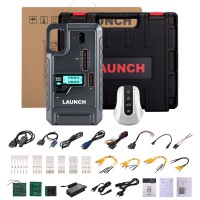
US SHIP LAUNCH X-431 PROG5 G5 IMMO Programmer 3-in-1 IMMO Device Updated of X-prog3 Supports ECU TCU Cloning 5C 5D Key Programming
- Item No. HKSK510
- Free Shipping
Supports V850, RH850, MQB49 5C 5D key programming
Supports BMW ISN reading, more ECU TCU module cloning
Works with PC software without converter.
Where to download PC software for the new Launch X-Prog5 (Prog5/G5) programmer?
Free download Launch Prog5 PC software
Visit https://en.cnlaunch.com.
Go to Service- Downloads & Upgrade.
Scroll down and download X-431 ECU Clone Software.

Operating system: Win8, Win10
Language: English, German, Russian, Japanese, French, Portuguese, Korean, Italian, Spanish, Arabic
NOTE: The appropriate language-specific installation package must be selected prior to download, as the software does not allow language switching after installation.
How to install, register and activate Launch G5 PC software?
The software installation is easy. Install ECU_Clone PC.setup until finished.
After installing the software, connect the G5 programmer and open the software. Click Confirm.


G5 will ask for login. Enter your email address and send a verification code.
Input verification to login.

G5 says the device is not registered yet. Click Yes to register device.

Click Activate to bind the current PC box.

Enter the activation code for the device.
The activation code is on the accessory list in the box.
Enter the activation code and hit Activate.
Activation successful.

The software is ready to use.